EDATE function.Get a date (serial value) after the specified month, taking into account the last day of the month.(Microsoft Excel)
Get a date (serial value) after the specified month, taking into account the last day of the month.
Contents
How it works
=EDATA(Start_date,Months)
| Argument | Omission | Specify |
|---|---|---|
| Start_date | Required argument. | Target date for the calculation. |
| Months | Required argument. | Number of months to be added. Positive number for future, negative number for past. |
Example Results
These are the results of executing the EDATE and DATE functions by argument.
| Function | Formura |
|---|---|
| EDATE | =EDATE(Start_date,Months) |
| DATE | =DATE(YEAR(Start_date),MONTH(Start_date)+Months,DAY(Start_date)) |
Patterns with different result dates have a yellow background color.
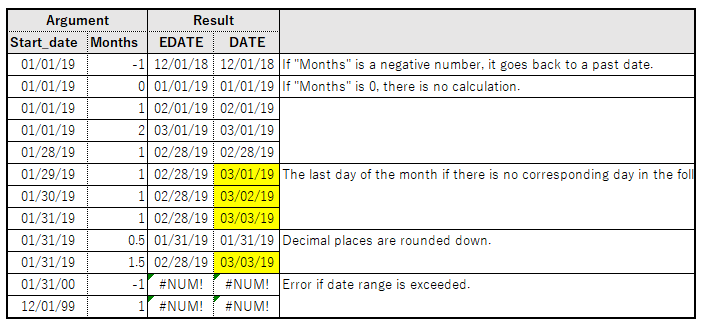
To add one month to January 31, the EDATE function takes into account the difference in the last day of the month and returns 2/28 as the result.
The DATE function adds 31 days and the result is 3/3.
---