CHAR Function. Get the character corresponding to a numeric code.(Microsoft Excel)
What is displayed as a character is also treated internally by the computer as a number.
The CHAR function allows you to specify a numeric value and get the corresponding character.
It works in the opposite way to the CODE function.
Contents
How it works
=CHAR(number)
| Name | Omission | Description |
|---|---|---|
| number | Required argument. | Specify the numeric code to get the corresponding character. |
Demonstrate
Here are some examples of formulas and results.
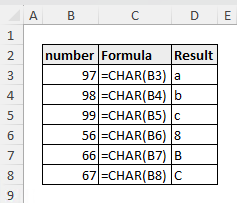
Although it is rarely used alone, it is used when you want to include special characters in a formula.
| Character | Formula |
|---|---|
| Line break | =CHAR(10) |
| TAB | =CHAR(9) |
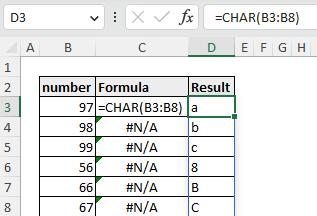
Spill
Spill if the parameters is a cell range.
---