How to get the earlier or later date.Date and time comparison. (Power Automate Desktop)
This section shows how to get the earlier or later date (Date and time comparison).
Contents
Steps
Datetime can be compared in the same way as numerical values, using "If" to compare large and small.
The past (early) is considered small and the future (late) is considered large.
When this flow is executed, the more past (earlier) dates of Date1 and Date2 are set to %ResultDate%.
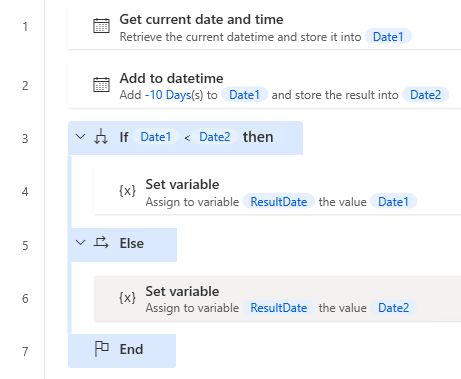
DateTime.GetCurrentDateTime.Local DateTimeFormat: DateTime.DateTimeFormat.DateAndTime CurrentDateTime=> Date1
DateTime.Add DateTime: Date1 TimeToAdd: -10 TimeUnit: DateTime.TimeUnit.Days ResultedDate=> Date2
IF Date1 < Date2 THEN
    SET ResultDate TO Date1
ELSE
    SET ResultDate TO Date2
END
For those who want to learn Power Automate Desktop effectively
The information on this site is now available in an easy-to-read e-book format.
Or Kindle Unlimited (unlimited reading).

You willl discover how to about basic operations.
By the end of this book, you will be equipped with the knowledge you need to use Power Automate Desktop to streamline your workflow.