

Extended version of the SUM function to obtain the sum of cells matching a criteria.
The SUMIF function specifies a single condition, but there is also a SUMIFS function that specifies multiple criterias.
How it works
=SUMIF(range, criteria, sum_range)
| Name | Omission | Explanation |
|---|---|---|
| range | Required argument. | Range of cells to be evaluated for the search criteria. |
| criteria | Required argument. | Criteria to be totaled. |
| sum_range | Same as range. | Cell range to be summed. Specify when the condition and the cell range of the tally are different. Non-numeric cells are excluded. |
Demonstrate
For example, it can be used to total the sales of a specific category of products.
It is also used in cases where a comparison of large and small amounts is required, such as when the total is greater than a certain amount.
The following is an example of a SUMIF function that refers to the table below.

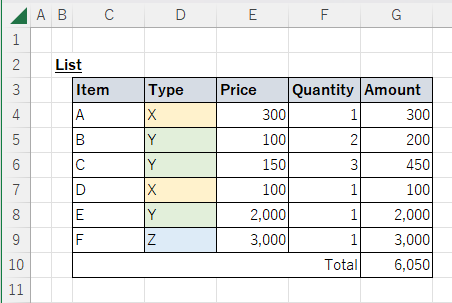
Example of summing numbers matching a specific text.
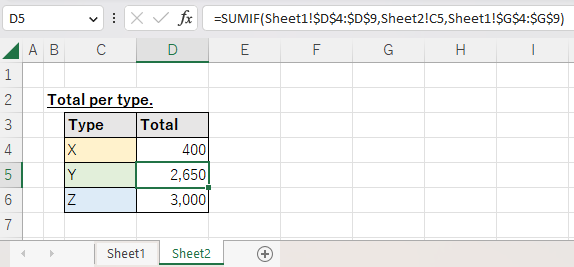
The following is an example of searching List for Price matching Type in column C and summing them.
The range and sum_range are fixed as absolute cell reference, since the referenced list does not change even if the position is changed by copying.
=SUMIF(Sheet1!$D$4:$D$9,Sheet2!C4,Sheet1!$G$4:$G$9)

Ambiguous search. Example of using wildcards.
The wildcard * can be used for fuzzy searches.
=SUMIF(B3:B8,"Inu",C3:C8)

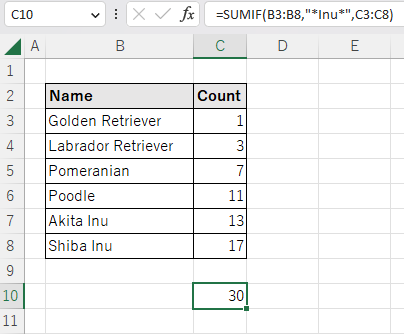
The "*" can be added only to the front for backward matching, only to the back for forward matching, or to both for partial matching.
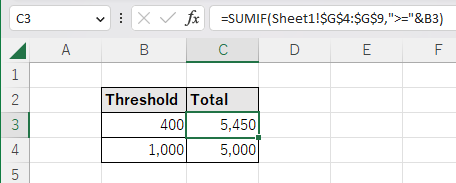
Example of setting a numerical threshold and summing.
If a comparison operator is specified for a criteria, it becomes a threshold value.
Total Amount of Amount over 400 and Amount over 1000.
The operators are combined as a string.
=SUMIF(Sheet1!$G$4:$G$9,">="&B3)

Spill
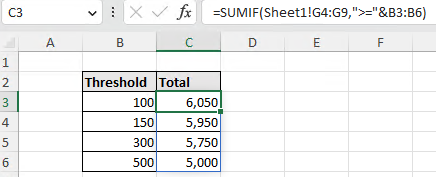
If a cell range is specified for the "Criteria", it will be Spill.

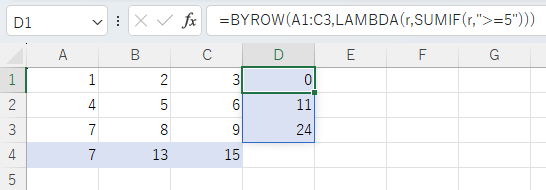
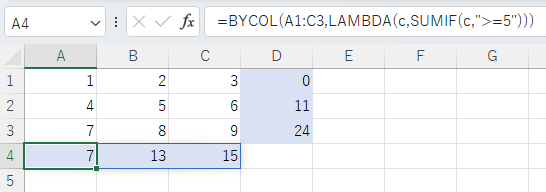
Spill when using the BYROW or BYCOL function.
=BYROW(A1:C3,LAMBDA(r,SUMIF(r,">=5")))

=BYCOL(A1:C3,LAMBDA(c,SUMIF(c,">=5")))

---