

The TRUNC function truncates a number less than a specified digit.
How it works
=TRUNC(Number,Num_digits)
| Parameter | Omission | Description |
|---|---|---|
| Number | Required field. | Specifies the number to be truncated. |
| Num_digits | 0 | Specifies the number of digits to truncate (see below). |
| Num_digits | ... | -2 | -1 | 0 | 1 | 2 | ... |
| The digits to be truncated. | ... | less than 100 place. | less than 10 place. | Less than 1 place. | To the first decimal place. | To two decimal place. | ... |
Demonstrate
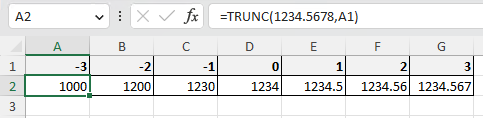
TRUNC function results by number of digits.
| Num_digits | Result |
|---|---|
| -3 | 1000 |
| -2 | 1200 |
| -1 | 1230 |
| 0 | 1234 |
| 1 | 1234.5 |
| 2 | 1234.56 |
| 3 | 1234.567 |

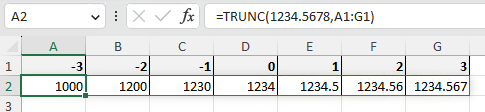
Spill
Spill if the parameters is a cell range.

---