

The LEN function gets the number of characters in a text.
Because it is faster and more accurate than counting by eye, it has a great effect by itself and is a useful function with a wide range of applications.
How it works
=LEN(string)
| Name | Omission | Specify |
|---|---|---|
| string | Required argument. | Text that counts the number of characters. |
Demonstrate
Both one-byte and two-byte characters are counted as one character.

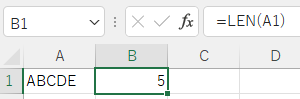
Control characters are also counted as a single character.
Therefore, if there is a line break in a cell, it is also counted as one character.

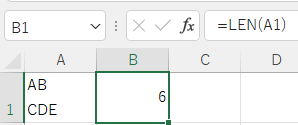
Spill
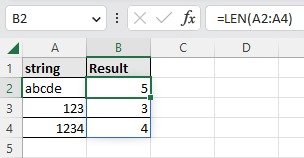
If the argument were a cell range, it would be Spill.

---